{"cells":[{"metadata":{},"cell_type":"markdown","source":"VinBigData Chest X-ray Abnormalities Detection
\nUtility To Convert Annotations From CSV to Pascal VOC XML
\nCREATED BY: DARIEN SCHETTLER
\n"},{"metadata":{},"cell_type":"markdown","source":"TABLE OF CONTENTS
\n\n---\n\n\n\n---\n\n\n\n---\n\n\n\n---\n\n\n\n---\n\n\n\n---\n\n\n"},{"metadata":{},"cell_type":"markdown","source":"0 IMPORTS"},{"metadata":{"_uuid":"8f2839f25d086af736a60e9eeb907d3b93b6e0e5","_cell_guid":"b1076dfc-b9ad-4769-8c92-a6c4dae69d19","trusted":true},"cell_type":"code","source":"# PIP Installs\n!pip install -q pylibjpeg pylibjpeg-libjpeg pylibjpeg-openjpeg\n\n# Machine Learning and Data Science Imports\nimport tensorflow_probability as tfp\nimport tensorflow_datasets as tfds\nimport tensorflow_addons as tfa\nimport tensorflow_hub as hub\nfrom skimage import exposure\nimport pandas as pd; pd.options.mode.chained_assignment = None\nimport numpy as np\nimport scipy\n\n# Built In Imports\nimport xml.etree.ElementTree as ET\nfrom datetime import datetime\nfrom glob import glob\nimport warnings\nimport IPython\nimport urllib\nimport zipfile\nimport pickle\nimport shutil\nimport string\nimport math\nimport tqdm\nimport time\nimport os\nimport gc\nimport re\n\n# Visualization Imports\nFIG_FONT = dict(family=\"Helvetica, Arial\", size=14, color=\"#7f7f7f\")\nfrom matplotlib.colors import ListedColormap\nimport matplotlib.patches as patches\nimport plotly.graph_objects as go\nimport matplotlib.pyplot as plt\nimport plotly.express as px\nfrom lxml import etree\nimport seaborn as sns\nfrom PIL import Image\nimport plotly\nimport PIL\nimport cv2\n\n# Other Imports\nfrom pydicom.pixel_data_handlers.util import apply_voi_lut\nfrom tqdm.notebook import tqdm\nimport pydicom","execution_count":null,"outputs":[]},{"metadata":{},"cell_type":"markdown","source":"1 NOTEBOOK SETUP"},{"metadata":{"trusted":true},"cell_type":"code","source":"# Define the root data directory\nDATA_DIR = \"/kaggle/input/vinbigdata-chest-xray-abnormalities-detection\"\n\n# Define the paths to the training and testing dicom folders respectively\nTRAIN_DIR = os.path.join(DATA_DIR, \"train\")\nTEST_DIR = os.path.join(DATA_DIR, \"test\")\nXML_OUTPUT_DIR = \"/kaggle/working/train_xml_files\"\n\nif not os.path.isdir(XML_OUTPUT_DIR):\n os.makedirs(XML_OUTPUT_DIR, exist_ok=True)\n \n# Capture all the relevant full train/test paths\nTRAIN_DICOM_PATHS = [os.path.join(TRAIN_DIR, f_name) for f_name in os.listdir(TRAIN_DIR)]\nTEST_DICOM_PATHS = [os.path.join(TEST_DIR, f_name) for f_name in os.listdir(TEST_DIR)]\nprint(f\"\\n... The number of training files is {len(TRAIN_DICOM_PATHS)} ...\")\nprint(f\"... The number of testing files is {len(TEST_DICOM_PATHS)} ...\")\n\n\n# Define paths to the relevant csv files\nTRAIN_CSV = os.path.join(DATA_DIR, \"train.csv\")\nSS_CSV = os.path.join(DATA_DIR, \"sample_submission.csv\")\n\n# Create the relevant dataframe objects\ntrain_df = pd.read_csv(TRAIN_CSV)\nss_df = pd.read_csv(SS_CSV)\n\nprint(\"\\n\\nTRAIN DATAFRAME\\n\\n\")\ndisplay(train_df.head(3))\n\nprint(\"\\n\\nSAMPLE SUBMISSION DATAFRAME\\n\\n\")\ndisplay(ss_df.head(3))","execution_count":null,"outputs":[]},{"metadata":{},"cell_type":"markdown","source":"2 BACKGROUND INFORMATION\n\n* Pascal VOC provides standardized image data sets for object detection. \n* Pascal VOC is an XML file, unlike COCO which has a JSON file.\n* In Pascal VOC we create a file for each of the image in the dataset. \n* The bounding Box in Pascal VOC is formatted as: **(xmin, ymin, xmax, ymax)**\n\n**Here is an example**\n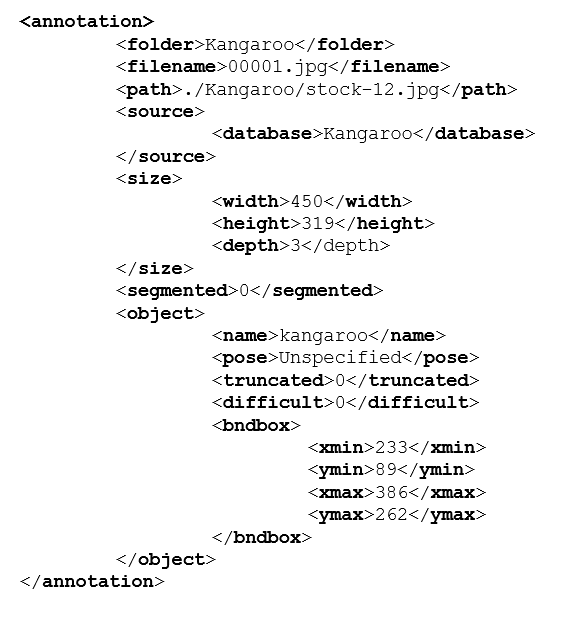"},{"metadata":{},"cell_type":"markdown","source":"3 HELPER FUNCTIONS"},{"metadata":{"_uuid":"d629ff2d2480ee46fbb7e2d37f6b5fab8052498a","_cell_guid":"79c7e3d0-c299-4dcb-8224-4455121ee9b0","trusted":true},"cell_type":"code","source":"def dicom2array(path, voi_lut=True, fix_monochrome=True):\n \"\"\" Convert dicom file to numpy array \n \n Args:\n path (str): Path to the dicom file to be converted\n voi_lut (bool): Whether or not VOI LUT is available\n fix_monochrome (bool): Whether or not to apply monochrome fix\n \n Returns:\n Numpy array of the respective dicom file \n \n \"\"\"\n # Use the pydicom library to read the dicom file\n dicom = pydicom.read_file(path)\n \n # VOI LUT (if available by DICOM device) is used to \n # transform raw DICOM data to \"human-friendly\" view\n if voi_lut:\n data = apply_voi_lut(dicom.pixel_array, dicom)\n else:\n data = dicom.pixel_array\n \n # The XRAY may look inverted\n # - If we want to fix this we can\n if fix_monochrome and dicom.PhotometricInterpretation == \"MONOCHROME1\":\n data = np.amax(data) - data\n \n # Normalize the image array and return\n data = data - np.min(data)\n data = data / np.max(data)\n data = (data * 255).astype(np.uint8)\n return data\n\ndef pprint_elem_tree(tree):\n \"\"\" Pretty Print ElementTree Object (XML) \"\"\"\n if type(tree) != str:\n tree = ET.tostring(tree)\n print(etree.tostring(etree.fromstring(tree), pretty_print=True).decode())\n\n \ndef plot_image(img, title=\"\", figsize=(8,8), cmap=None):\n \"\"\" Function to plot an image to save a bit of time \"\"\"\n plt.figure(figsize=figsize)\n \n if cmap:\n plt.imshow(img, cmap=cmap)\n else:\n img\n plt.imshow(img)\n \n plt.title(title, fontweight=\"bold\")\n plt.axis(False)\n plt.show()\n \n\ndef draw_bboxes(img, tl, br, rgb, label=\"\", label_location=\"tl\", opacity=0.1, line_thickness=0):\n \"\"\" TBD \n \n Args:\n TBD\n \n Returns:\n TBD \n \"\"\"\n rect = np.uint8(np.ones((br[1]-tl[1], br[0]-tl[0], 3))*rgb)\n sub_combo = cv2.addWeighted(img[tl[1]:br[1],tl[0]:br[0],:], 1-opacity, rect, opacity, 1.0) \n img[tl[1]:br[1],tl[0]:br[0],:] = sub_combo\n\n if line_thickness>0:\n img = cv2.rectangle(img, tuple(tl), tuple(br), rgb, line_thickness)\n \n if label:\n # DEFAULTS\n FONT = cv2.FONT_HERSHEY_SIMPLEX\n FONT_SCALE = 1.666\n FONT_THICKNESS = 3\n FONT_LINE_TYPE = cv2.LINE_AA\n \n if type(label)==str:\n LABEL = label.upper().replace(\" \", \"_\")\n else:\n LABEL = f\"CLASS_{label:02}\"\n \n text_width, text_height = cv2.getTextSize(LABEL, FONT, FONT_SCALE, FONT_THICKNESS)[0]\n \n label_origin = {\"tl\":tl, \"br\":br, \"tr\":(br[0],tl[1]), \"bl\":(tl[0],br[1])}[label_location]\n label_offset = {\n \"tl\":np.array([0, -10]), \"br\":np.array([-text_width, text_height+10]), \n \"tr\":np.array([-text_width, -10]), \"bl\":np.array([0, text_height+10])\n }[label_location]\n img = cv2.putText(img, LABEL, tuple(label_origin+label_offset), \n FONT, FONT_SCALE, rgb, FONT_THICKNESS, FONT_LINE_TYPE)\n \n return img\n\n\ndef get_annotated_image(image_id, annots, plot=False, plot_size=(18,25), plot_title=\"\", resize_to=None):\n pal = [tuple([int(x) for x in np.array(c)*(255,255,255)]) for c in sns.color_palette(\"Spectral\", 14)]\n\n if type(annots) != list:\n image_annots = annots[image_id]\n else:\n image_annots = annots\n\n img = cv2.cvtColor(dicom2array(image_annots[0][\"img_path\"]), cv2.COLOR_GRAY2RGB)\n \n if resize_to is not None:\n img = cv2.resize(img, resize_to, interpolation=cv2.INTER_LANCZOS4)\n \n for ann in image_annots:\n if ann[\"class_id\"] != 14:\n img = draw_bboxes(img, \n ann[\"bbox\"][:2], ann[\"bbox\"][-2:], \n rgb=pal[ann[\"class_id\"]], \n label=int_2_str[ann[\"class_id\"]], \n opacity=0.08, line_thickness=4)\n if plot:\n plot_image(img, title=plot_title, figsize=plot_size)\n\n return img\n\n# Create dictionary mappings\nint_2_str = {i:train_df[train_df[\"class_id\"]==i].iloc[0][\"class_name\"] for i in range(15)}\nstr_2_int = {v:k for k,v in int_2_str.items()}\nstr_2_int_xml = {k.lower().replace(\" \", \"_\"):v for k,v in str_2_int.items()}\n\nprint(\"\\n... Dictionary Mapping Class Integer to Class String Representation [int_2_str]...\\n\")\ndisplay(int_2_str)\n\nprint(\"\\n... Dictionary Mapping Class String to Class Integer Representation [str_2_int]...\\n\")\ndisplay(str_2_int)\n\nprint(\"\\n... Head of Train Dataframe After Dropping The Class Name Column...\\n\")\ntrain_df.drop(columns=[\"class_name\"], inplace=True)\ndisplay(train_df.head(5))","execution_count":null,"outputs":[]},{"metadata":{},"cell_type":"markdown","source":"4 CONVERTING TRAINING DATA INTO PASCAL-VOC XMLS"},{"metadata":{},"cell_type":"markdown","source":"4.1 MAIN FUNCTION
\n\n---\n\nTBD"},{"metadata":{"trusted":true},"cell_type":"code","source":"def create_xml_file(df, image_id, train_dir, out_dir, display=False):\n \"\"\" Converts an images annotations to Pascal VOC (XML) and writes to disk\n \n Args:\n df (pd.DataFrame): TBD\n image_id (str): The image_id that we want to generate an XML file for\n train_dir (str): Path to the directory containing training\n dicom image files.\n out_dir (str): Path to the directory to save the XML file\n display (bool, optional): Whether to pretty-print the XML\n file prior to writing it to file.\n \n Returns:\n None; It writes the Pascal VOC converted information to file\n as an XML file in the directed output directory.\n \"\"\"\n def _get_image_size(path):\n \"\"\" Get the image shape from a path to a dicom image \"\"\"\n meta = pydicom.read_file(path)\n width = meta.Columns\n height = meta.Rows\n return str(int(width)), str(int(height)), \"1\"\n \n def resize(old_img_w, old_img_h, new_img_w=1280, new_img_h=1280):\n w_ratio = new_img_w/int(old_img_w)\n h_ratio = new_img_h/int(old_img_h)\n return new_img_w, new_img_h, w_ratio, h_ratio\n \n \n def _create_object_subtree(annotation, obj, w_ratio, h_ratio):\n \"\"\" Create the sub-tree related to a given object and update the root \"\"\"\n # Object Sub-Element\n # Check that bbox is not NaN\n if not np.isnan(obj[3]):\n _object = ET.SubElement(annotation, \"object\")\n ET.SubElement(_object, \"name\").text = int_2_str[obj[1]].lower().replace(\" \", \"_\")\n ET.SubElement(_object, \"radiologist\").text = obj[2]\n ET.SubElement(_object, \"pose\").text = \"Unspecified\"\n ET.SubElement(_object, \"truncated\").text = \"0\"\n ET.SubElement(_object, \"difficult\").text = \"0\"\n\n _bndbox = ET.SubElement(_object, \"bndbox\")\n ET.SubElement(_bndbox, \"xmin\").text = str(int(obj[3]*w_ratio))\n ET.SubElement(_bndbox, \"ymin\").text = str(int(obj[4]*h_ratio))\n ET.SubElement(_bndbox, \"xmax\").text = str(int(obj[5]*w_ratio))\n ET.SubElement(_bndbox, \"ymax\").text = str(int(obj[6]*h_ratio))\n return annotation\n \n # Initalize and create the objects array\n objects = train_df[train_df.image_id==DEMO_IMG_ID].to_numpy()\n annotation = ET.Element('annotation')\n img_w, img_h, img_d = _get_image_size(os.path.join(train_dir, image_id+\".dicom\"))\n img_w, img_h, w_ratio, h_ratio = resize(img_w, img_h)\n \n # ##### Beginning of XML #####\n \n # File Sub-Elements\n ET.SubElement(annotation, \"folder\").text=\"train\"\n ET.SubElement(annotation, \"filename\").text=image_id+\".dicom\"\n ET.SubElement(annotation, \"path\").text=os.path.join(train_dir, image_id+\".dicom\")\n\n # SRC Sub-Element\n _src = ET.SubElement(annotation, \"src\")\n ET.SubElement(_src, \"database\").text=\"train\"\n \n # Size Sub-Element\n _size = ET.SubElement(annotation, \"size\")\n ET.SubElement(_size, \"width\").text=str(img_w)\n ET.SubElement(_size, \"height\").text=str(img_h)\n ET.SubElement(_size, \"depth\").text=str(img_d)\n \n # Segmented Sub-Element\n ET.SubElement(annotation, \"segmented\").text=\"0\"\n \n # Loop over every object and create the annotation for that bounding box\n for obj in objects:\n annotation = _create_object_subtree(annotation, obj, w_ratio, h_ratio)\n \n # Display if requested\n if display:\n pprint_elem_tree(annotation)\n \n # Save to output directory\n ET.ElementTree(annotation).write(os.path.join(out_dir, image_id+'.xml'))\n \nDEMO_IMG_ID = \"9a5094b2563a1ef3ff50dc5c7ff71345\"\nDEMO_PATH = os.path.join(TRAIN_DIR, DEMO_IMG_ID+\".dicom\")\n\ncreate_xml_file(train_df, DEMO_IMG_ID, TRAIN_DIR, out_dir=\"/tmp\", display=True)\n\nprint(\"Look into the tmp folder to see that the xml was created...\")\nfor file in [f for f in os.listdir(\"/tmp\") if f.endswith(\".xml\")]: print(\"\\t– /tmp/\"+file)","execution_count":null,"outputs":[]},{"metadata":{},"cell_type":"markdown","source":"4.2 REDUCE TRAINING DATA
\n\n---\n\nTBD"},{"metadata":{"trusted":true},"cell_type":"code","source":"def calc_iou(bbox_1, bbox_2):\n # determine the coordinates of the intersection rectangle\n x_left = max(bbox_1[0], bbox_2[0])\n y_top = max(bbox_1[1], bbox_2[1])\n x_right = min(bbox_1[2], bbox_2[2])\n y_bottom = min(bbox_1[3], bbox_2[3])\n\n # Check if bboxes overlap at all (if not return 0)\n if x_right < x_left or y_bottom < y_top:\n return 0.0\n \n # The intersection of two axis-aligned bounding boxes is always an\n # axis-aligned bounding box\n else:\n intersection_area = (x_right - x_left) * (y_bottom - y_top)\n \n # compute the area of both AABBs\n bbox_1_area = (bbox_1[2] - bbox_1[0]) * (bbox_1[3] - bbox_1[1])\n bbox_2_area = (bbox_2[2] - bbox_2[0]) * (bbox_2[3] - bbox_2[1])\n\n # compute the intersection over union by taking the intersection\n # area and dividing it by the sum of prediction + ground-truth\n # areas - the interesection area\n iou = intersection_area / float(bbox_1_area + bbox_2_area - intersection_area)\n return iou\n\ndef redux_bboxes(annots):\n def _get_inner_box(bboxes):\n xmin = max([box[0] for box in bboxes])\n ymin = max([box[1] for box in bboxes])\n xmax = min([box[2] for box in bboxes])\n ymax = min([box[3] for box in bboxes])\n if (xmax<=xmin) or (ymax<=ymin):\n return None\n else:\n return [xmin, ymin, xmax, ymax]\n \n valid_list_indices = [] \n new_bboxes = []\n new_class_ids = []\n new_rad_ids = []\n \n for i, (class_id, rad_id, bbox) in enumerate(zip(annots[\"class_id\"], annots[\"rad_id\"], annots[\"bbox\"])):\n intersecting_boxes = [bbox,]\n other_bboxes = [x for j,x in enumerate(annots[\"bbox\"]) if j!=i]\n other_classes = [x for j,x in enumerate(annots[\"class_id\"]) if j!=i]\n for j, (other_class_id, other_bbox) in enumerate(zip(other_classes, other_bboxes)):\n if class_id==other_class_id:\n iou = calc_iou(bbox, other_bbox)\n if iou>0.:\n intersecting_boxes.append(other_bbox)\n\n if len(intersecting_boxes)>1:\n inner_box = _get_inner_box(intersecting_boxes)\n if inner_box and inner_box not in new_bboxes:\n new_bboxes.append(inner_box)\n new_class_ids.append(class_id)\n new_rad_ids.append(rad_id) \n\n annots[\"bbox\"] = new_bboxes\n annots[\"rad_id\"] = new_rad_ids\n annots[\"class_id\"] = new_class_ids\n \n return annots\n\n# Make GT Dataframe\ngt_df = train_df[train_df.class_id!=14]\n\n# Apply Manipulations and Merger Functions\ngt_df[\"bbox\"] = gt_df.loc[:, [\"x_min\",\"y_min\",\"x_max\",\"y_max\"]].values.tolist()\ngt_df.drop(columns=[\"x_min\",\"y_min\",\"x_max\",\"y_max\"], inplace=True)\ngt_df = gt_df.groupby([\"image_id\"]).agg({k:list for k in gt_df.columns if k !=\"image_id\"}).reset_index()\ngt_df = gt_df.apply(redux_bboxes, axis=1)\n\n# Recreate the Original Dataframe Style\ngt_df = gt_df.apply(pd.Series.explode).reset_index(drop=True).dropna()\ngt_df[\"x_min\"] = gt_df[\"bbox\"].apply(lambda x: x[0])\ngt_df[\"y_min\"] = gt_df[\"bbox\"].apply(lambda x: x[1])\ngt_df[\"x_max\"] = gt_df[\"bbox\"].apply(lambda x: x[2])\ngt_df[\"y_max\"] = gt_df[\"bbox\"].apply(lambda x: x[3])\ngt_df.drop(columns=[\"bbox\"], inplace=True)\n\n# Add back in NaN Rows As A Single Annotation\ngt_df = pd.concat([\n gt_df, train_df.loc[train_df['class_id'] == 14].drop_duplicates(subset=[\"image_id\"])\n]).reset_index(drop=True)\n\ngt_df","execution_count":null,"outputs":[]},{"metadata":{},"cell_type":"markdown","source":"4.3 EXECUTE OVER TRAINING DATA
\n\n---\n\nTBD"},{"metadata":{"trusted":true},"cell_type":"code","source":"for unique_id in tqdm(gt_df.image_id.unique(), total=len(gt_df.image_id.unique())):\n create_xml_file(gt_df, unique_id, TRAIN_DIR, out_dir=XML_OUTPUT_DIR)","execution_count":null,"outputs":[]},{"metadata":{},"cell_type":"markdown","source":"5 READING TRAINING DATA FROM PASCAL-VOC XMLS"},{"metadata":{"trusted":true},"cell_type":"code","source":"def read_xml_file(xml_path):\n \"\"\" Return a dictionary containing information from XML file \n \n Args:\n xml_path (str): Path to the XML file to be read\n \n Returns:\n dictionary containing ...\n \"\"\"\n \n tree = ET.parse(xml_path)\n root = tree.getroot()\n\n # Initalize the dictionary\n image_id = root.find(\"filename\").text[:-6]\n image_path = root.find(\"path\").text\n annotations = {image_id:[]}\n \n for obj in root.findall(\"object\"):\n bbox = obj.find(\"bndbox\")\n annotations[image_id].append(dict(\n img_path=image_path,\n img_id=image_id,\n class_id=str_2_int_xml[obj.find(\"name\").text],\n rad_id=obj.find(\"radiologist\").text,\n bbox=np.array([int(bbox.find(\"xmin\").text), \n int(bbox.find(\"ymin\").text), \n int(bbox.find(\"xmax\").text), \n int(bbox.find(\"ymax\").text)], dtype=np.int32)\n ))\n return annotations\n \n# DEMO_PATH = os.path.join(\"/tmp\", DEMO_IMG_ID+\".xml\")\n# demo_annotations = read_xml_file(DEMO_PATH)\n# ann = get_annotated_image(DEMO_IMG_ID, demo_annotations, plot=True, plot_size=(20,25), plot_title=f\"Image With Bounding Boxes From XML – {DEMO_IMG_ID}\", resize_to=(1024,1024))","execution_count":null,"outputs":[]},{"metadata":{},"cell_type":"markdown","source":"# TO BE CLEANED UP LATER"}],"metadata":{"kernelspec":{"language":"python","display_name":"Python 3","name":"python3"},"language_info":{"pygments_lexer":"ipython3","nbconvert_exporter":"python","version":"3.6.4","file_extension":".py","codemirror_mode":{"name":"ipython","version":3},"name":"python","mimetype":"text/x-python"}},"nbformat":4,"nbformat_minor":4}